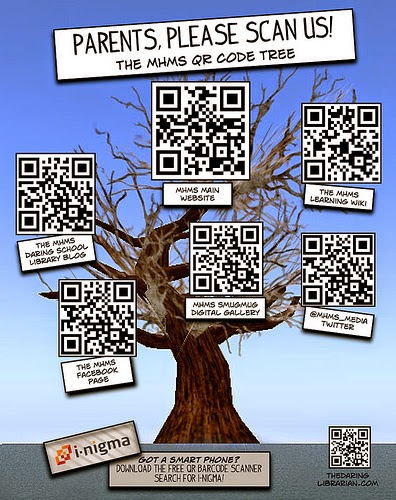
A QR (quick response) code is a type of image that holds information (up to 4296 alphanumeric characters) that can be scanned by mobile devices, such as tablets and smartphones. It can contain many forms of information including: text, contact details, website addresses, links to YouTube videos, references etc. There are many applications for QR codes. Here are some examples:
-Library book add-ons with links to info about the author and other books
-Scavenger hunts and webquests with codes placed around classroom or school
-Homework add-ons with links to helpful sites and sources
-QR stations for self-directed learning with codes revealing tasks
-Assistive technology giving alternative access format for reading and writing support
-Classroom hotspots to access videos, websites related to curriculum and lesson plans
-Handout links for further reading & research
-Extension activities for students who finish assignments early
-Interactive classroom calendar for upcoming events and reminders
-Parent communication with links to school website
Creating QR codes for your class is easy. Once you've decided on the content you want to put into your QR code, just follow these steps:
1) Open this QR code generator: QR Stuff
2) Paste your URL under the "Content" section
3) A QR code will be generated under "Preview" section
4) Download, save and print QR code
5) Use QR code reader to scan image Top 10 QR code readers
Showing posts with label Technology. Show all posts
Friday, 12 December 2014
Sunday, 7 December 2014
SAMR is Not a Ladder
The SAMR model, developed by Ruben Puenterdura, provides teachers with a framework to help them move from an introductory (substitutional) use of technology to a level that is more transformational. It is based on Puenterdura's research from observations of 1:1 laptop integration. The SAMR taxonomy enables teachers to think about how learning takes place in their classroom and how technology can be integrated to provide deeper and more extensive learning. There are four different levels - from substitution and augmentation to modification and redefinition. As you move through the four levels of SAMR, there is a shift from teacher-centered to student-driven learning.
At the bottom level, substitution, one thing is simply exchanged for another. An example would be having students type an essay instead of writing it. This level of ICT is obvious very common in classrooms and has been utilized for many years. When substituting, there is no real functional change. At the level of augmentation, learning tasks are expanded through technology. If we take the previous example of typing and move it to the level of augmentation, some examples would be: adding speech bubbles to each paragraph to explain the meaning, adding images next to key words, hyperlinking text to information online etc. The next two levels, modification and redefinition, are where the really interesting and exciting applications of technology take place. These levels include activities that would not have been possible a few years ago, given the limitations of technology at the time. Some examples are: videoconferencing, movie narration, screencasting, global collaboration and networked blogging. While redefinition may be a bit of a hyperbole, it puts the emphasis on creative applications of technology and not simply just consuming it. It seeks to ensure that we don't just employ these tools for mindless "edutainment" and busy work.
Using the SAMR framework as a planning tool is an effective way for teachers to map out and plan their usage of technology in the classroom. It focuses on pedagogy and moves away from the notion of allowing the technology to drive the curriculum. The use of technology becomes more purposeful. Teachers shouldn't approach the SAMR model as a linear progressive ladder, but instead think of it as pool to wade in. As teachers become more comfortable with each level, they can seamlessly and fluidly move among the different levels.
At the bottom level, substitution, one thing is simply exchanged for another. An example would be having students type an essay instead of writing it. This level of ICT is obvious very common in classrooms and has been utilized for many years. When substituting, there is no real functional change. At the level of augmentation, learning tasks are expanded through technology. If we take the previous example of typing and move it to the level of augmentation, some examples would be: adding speech bubbles to each paragraph to explain the meaning, adding images next to key words, hyperlinking text to information online etc. The next two levels, modification and redefinition, are where the really interesting and exciting applications of technology take place. These levels include activities that would not have been possible a few years ago, given the limitations of technology at the time. Some examples are: videoconferencing, movie narration, screencasting, global collaboration and networked blogging. While redefinition may be a bit of a hyperbole, it puts the emphasis on creative applications of technology and not simply just consuming it. It seeks to ensure that we don't just employ these tools for mindless "edutainment" and busy work.
Using the SAMR framework as a planning tool is an effective way for teachers to map out and plan their usage of technology in the classroom. It focuses on pedagogy and moves away from the notion of allowing the technology to drive the curriculum. The use of technology becomes more purposeful. Teachers shouldn't approach the SAMR model as a linear progressive ladder, but instead think of it as pool to wade in. As teachers become more comfortable with each level, they can seamlessly and fluidly move among the different levels.
Wednesday, 3 December 2014
A New Approach
Education is still holding on to its old ways while trying to incorporate new technologies.
Even though the role of technology in society is rapidly evolving, schools are hesitant to reflect this change. Technology is forcing us to rethink how we learn, what we learn, when we learn and who we learn with. It is bombarding us with seemingly endless bits of information everyday and we need to be wary of taking a too "infocentric" approach to education. For too long, education has focused on the "expert" teacher delivering information to the student. We have to let go of this obsolete transmission approach. Technology can not just keep replicating this old model, but must be used for creative transformation. We should harness the power of these tools to help design and build new things. We should allow the innate creativity of students to imagine and innovate new possibilities. We should use these tools for re-inventing what school is really meant for. Experimenting and tinkering should be integral aspects of this new approach to learning. Students should be given the space to fail and fail often. The knowledge that students gain from reflecting on these mistakes will lead to a greater sense of ownership and an empowerment that is often lacking in today's schools.
Learning should be about an active construction of new knowledge.
Not a passive filling of minds.
Even though the role of technology in society is rapidly evolving, schools are hesitant to reflect this change. Technology is forcing us to rethink how we learn, what we learn, when we learn and who we learn with. It is bombarding us with seemingly endless bits of information everyday and we need to be wary of taking a too "infocentric" approach to education. For too long, education has focused on the "expert" teacher delivering information to the student. We have to let go of this obsolete transmission approach. Technology can not just keep replicating this old model, but must be used for creative transformation. We should harness the power of these tools to help design and build new things. We should allow the innate creativity of students to imagine and innovate new possibilities. We should use these tools for re-inventing what school is really meant for. Experimenting and tinkering should be integral aspects of this new approach to learning. Students should be given the space to fail and fail often. The knowledge that students gain from reflecting on these mistakes will lead to a greater sense of ownership and an empowerment that is often lacking in today's schools.
Learning should be about an active construction of new knowledge.
Not a passive filling of minds.
Tuesday, 2 December 2014
What's the Purpose?
Everyday brings a shiny new app or tool which professes to make learning better, faster and more engaging. As teachers, we need to take a step back, pause and think about how all this technology will impact our students' learning. To not just use technology for the sake of using technology. To not get caught up in the all hype. There's no question many of the recent advances in technology can benefit and enhance learning, but we need to be discerning and selective when choosing which tools to use.
When deciding whether or not to use technology in your classroom for a potential project, consider the following questions:
What is the purpose? (Is it purely aesthetic?)
Can it prevent students from sharpening important skills?
Do you have the time to integrate it fully and completely?
Is the project missing a technological student learning outcome?
Have your students already demonstrated mastery of the task?
Is there a better way for students to creatively and accurately illustrate their learning?
What is the learning curve for using the program or app?
Will it contribute to information overload? More does not always equal better!
Can the project compromise student problem-solving skills or critical thinking?
Will it create harmful shortcuts?
When deciding whether or not to use technology in your classroom for a potential project, consider the following questions:
What is the purpose? (Is it purely aesthetic?)
Can it prevent students from sharpening important skills?
Do you have the time to integrate it fully and completely?
Is the project missing a technological student learning outcome?
Have your students already demonstrated mastery of the task?
Is there a better way for students to creatively and accurately illustrate their learning?
What is the learning curve for using the program or app?
Will it contribute to information overload? More does not always equal better!
Can the project compromise student problem-solving skills or critical thinking?
Will it create harmful shortcuts?
Wednesday, 19 November 2014
Educreations - Student as Teacher
Educreations is an app that turns the iPad into a recordable, interactive whiteboard for creating Khan’s Academy-style tutorials, lessons, or stories. It’s both a teaching and learning tool, allowing users to create lessons and browse what others have created. It’s very simple to use and intuitive, requiring very little time to learn, and created videos can be used by anyone via iPad or computer. Educreations can be used either as a pedagogical tool in flipped or distance-learning classrooms or as a platform for student exhibition, allowing students to demonstrate learning, craft presentations, and teach each other.
This activity emphasizes the skill and art of planning by using Educreations to put students in the role of teachers. After researching a topic of interest, each student will devise an engaging method for sharing his or her knowledge with the class in a video medium, breaking down the steps to understanding a concept in an easy-to-follow format. This can also be used as a form of summative assessment because students must be masters of the material to effectively communicate the content and answer any questions posed by the teacher and fellow classmates. By sharing and storing these video lessons, students will feel a sense of ownership and accomplishment. Additionally, they will learn from their peers' expertise by participating in each others' lessons.
Step 1: Students sign up in pairs for a chapter or topic of interest. Step 2: Students conduct research on their topics. Step 3: Students draft lesson plans, learning objectives, and overarching structures of their lessons. Step 4: Students write, narrate, and create the video footage for their Educreations video lessons. Step 5: Students can share and present their video lessons, then archive them for future classes.
Source: http://educade.org/lesson_plans/turn-students-into-teachers-with-educreations
Source: https://www.youtube.com/watch?v=3Ye54chqOWQ
This activity emphasizes the skill and art of planning by using Educreations to put students in the role of teachers. After researching a topic of interest, each student will devise an engaging method for sharing his or her knowledge with the class in a video medium, breaking down the steps to understanding a concept in an easy-to-follow format. This can also be used as a form of summative assessment because students must be masters of the material to effectively communicate the content and answer any questions posed by the teacher and fellow classmates. By sharing and storing these video lessons, students will feel a sense of ownership and accomplishment. Additionally, they will learn from their peers' expertise by participating in each others' lessons.
Step 1: Students sign up in pairs for a chapter or topic of interest. Step 2: Students conduct research on their topics. Step 3: Students draft lesson plans, learning objectives, and overarching structures of their lessons. Step 4: Students write, narrate, and create the video footage for their Educreations video lessons. Step 5: Students can share and present their video lessons, then archive them for future classes.
Source: http://educade.org/lesson_plans/turn-students-into-teachers-with-educreations
Source: https://www.youtube.com/watch?v=3Ye54chqOWQ
Monday, 17 November 2014
Haiku Deck - Reading Response
The Arrival - Created with Haiku Deck, presentation software that inspires
In LEAP/ELL class, we have been reading "The Arrival" by Shaun Tan. Students are working on a photography project in which they choose 9 meaningful images from their lives that represent things they associate with their home country. They are also learning how to respond to texts. We have been looking at the strategies of making connections and visualizing. Using Haiku Deck, students wrote their 1st reading response and designed the slides to match with their responses. The 8 questions /prompts they had to respond to were: 1)What does this book remind you of? 2)Choose one image from the story that you loved. 3)What are 2 questions you have for the author? 4)What did you like about the story? 5)What did you not like about the story? 6)What would you change in the story? 7)How would you change the ending? 8)What were your 3 favourite things in the story? <
Wednesday, 12 November 2014
Friday, 7 November 2014
Saturday, 1 November 2014
Friday, 24 October 2014
Saturday, 4 October 2014
Subscribe to:
Posts (Atom)


